A fresh perspective on your desktop.
Your workflow.
One workspace.
Work with agents, query your data and automate tasks from one desktop app.
Linux, macOS and Windows · Free and built for your desktop · Version 0.1.0-beta.255
Inside OneSpace
Real OneSpace screenshots in the dark theme, with example data.


Five models, their scores and a link to check the source.
Find the top 5 AI models in 2026 on LLM Stats and tell me their scores.It opens LLM Stats and reads the ranking by LLM Stats Score.Five models, their scores and a link to check the source.Workflows and automation
Automate tasks across your tools
Combine queries, HTTP requests and agents in a visual workflow. Run it on demand or on a schedule, group steps in parallel and add a manual review where needed.
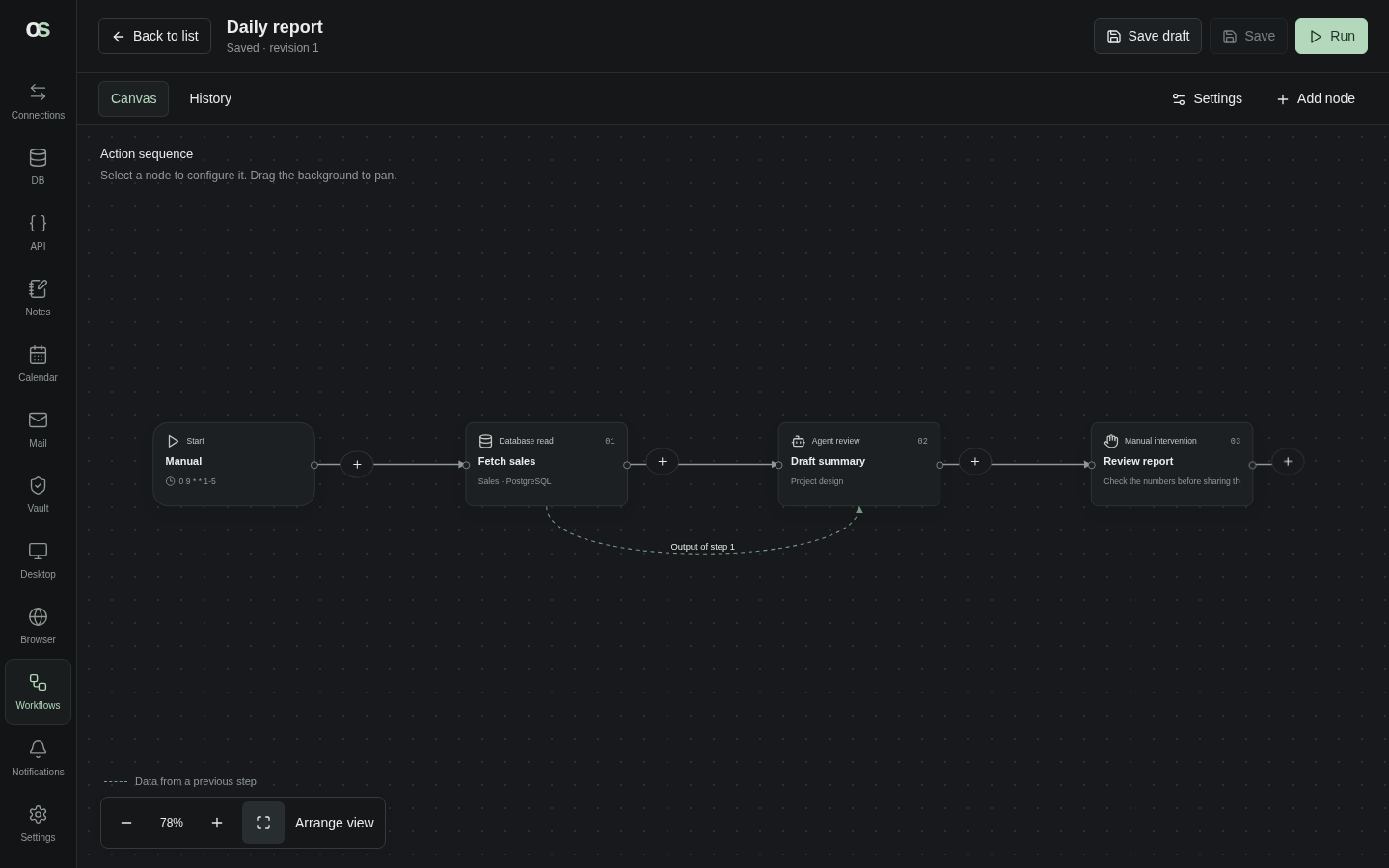
- Scheduled start
- Query data
- Summarise with an agent
- Human review
OneSpace tools
Development
Agents
Codex, Claude Code and OpenCode in panels with independent sessions.
Editor
Edit code, review Git changes and analyse CSV, Excel and Parquet.
Databases
Browse tables, run SQL and query MongoDB documents and Neo4j graphs.
API client
Test HTTP, GraphQL, WebSocket and gRPC. Import Postman collections and OpenAPI definitions.
Files and remote access
Files
Browse folders, preview documents and organise files in tabs.
Connections
Transfer files over SFTP, SCP, FTP, FTPS, WebDAV and S3.
Remote desktop
Open RDP and VNC sessions or Proxmox virtual machine consoles.
Browser
Browse websites and share a tab with an agent when you grant access.
Organisation
Notes
Write in local Markdown and explore links between notes in a graph.
Calendar
Manage local events or sync Google Calendar, iCloud and CalDAV.
Mail
Bring Gmail, Outlook, Microsoft 365 and IMAP accounts into one inbox.
Vault
Access Bitwarden, Vaultwarden, 1Password and KeePassXC. Copy supported TOTP codes.
OneSpace on your server
How to host OneSpace- Web preview
- Configure your panels in the browser. Agent execution is available in the desktop app.
- Personal portal
- Sign in with a passkey to view imported projects in read-only mode and check CPU, RAM and token usage.
Performance
- PostgreSQL queries
- 28% less time
- Multi-JOIN compared with DBeaver · p95
- API responses
- 20% less time
- Large JSON GET compared with Postman in Lightweight mode · p95
- FTP uploads
- 16% less time
- 200 files compared with the previous build · median
OneSpace guides
Install the app and set up your first tools.
Getting started
Install OneSpace and set up your workspace.
Install your AI providers
Steps and official links for Codex, Claude, OpenCode and every supported provider.
Host OneSpace on your server
Set up the web preview or the personal portal with passkeys.
Organise your notes
Open a Markdown folder and link your notes.
Make room
for what comes next.
Your next idea has a home.
OneSpace for your desktop
Linux · x64
Extract the archive and run OneSpace-Beta/start-beta.sh. Requires a desktop session with GTK3, NSS, ALSA and GBM.
Version 0.1.0-beta.255 · All downloads and how to verify them